Free Printable Handwriting Font Template for Custom Fonts
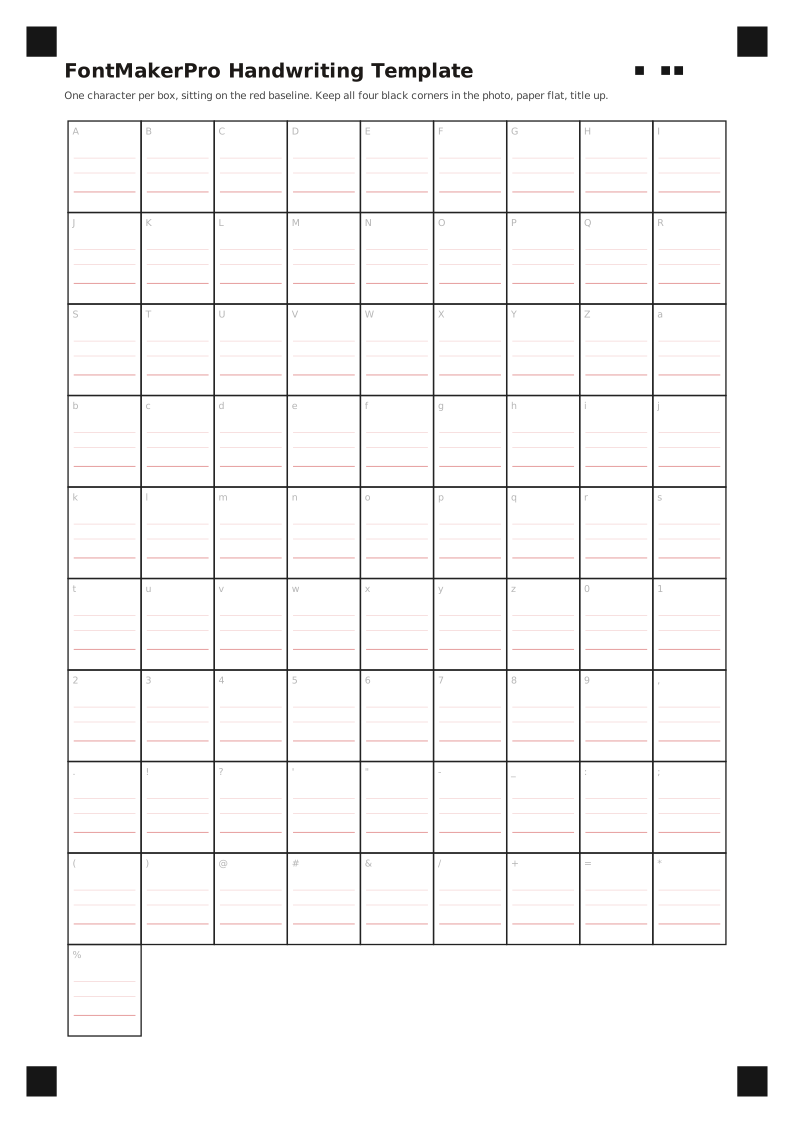
Creating your own custom typeface starts with a clear, well-structured sheet of paper. Our free handwriting font template provides an engineered A4 grid designed specifically to digitize your handwriting cleanly and convert your physical lettering into digital typography. Whether you prefer printing an A4 PDF handwriting font template or editing an SVG vector file, this printable handwriting font template aligns every glyph with precision markers for instant detection. Our in-browser font maker scans the completed handwriting font template entirely on your local device, meaning sign-in is optional and processing is 100% free. Simply download the handwriting font template, capture your natural handwriting across the designated cells, and generate a production-ready digital font without manual vector tracing.
How to Print and Fill Your Handwriting Font Template
Achieving crisp glyph vectors requires proper paper preparation before you write. Always output your handwriting font template at 100% scale without page scaling or fit-to-page margins, using standard A4 white paper to turn paper into an installable font. A dense black rollerball, calligraphy marker, or dark felt-tip pen produces clean contours on the handwriting font template that separate cleanly from the page background. Maintain a consistent baseline inside each bordered boundary of the printed handwriting font template, letting your individual penmanship express its authentic rhythm while avoiding accidental overlaps against the cell borders.
Each boxed cell in the handwriting font template accommodates one isolated letter, number, or punctuation mark. When turning your handwriting to font data, keep strokes deliberate and preserve authentic nuances without connecting cursive ligatures across cell dividers. If you make a mistake on a specific character, print a fresh handwriting font template or paste white correction paper flat over the cell instead of scribbling heavy cross-outs that confuse automatic bounding boxes.
Print and Pen Guidelines for Your Handwriting Font Template
- Print the A4 handwriting font template on clean white paper at full 100% scale without border scaling.
- Use a dark black gel pen or felt-tip marker on the handwriting font template for sharp glyph edges.
- Center each individual character neatly within its cell without touching the outer grid boundaries.
- Ensure the four alignment corner targets on the handwriting font template remain crisp and unobstructed.
Character Layout Inside the Handwriting Font Template
The standard handwriting font template contains 82 distinct Latin character slots arranged logically across the A4 grid. This handwriting font template includes uppercase letters from A through Z, lowercase letters from a through z, numerical digits from 0 to 9, and 20 fundamental punctuation symbols essential for any modern font. Beyond these primary 82 slots, FontMaker Pro automatically creates typographic spaces and a default missing glyph (.notdef), ensuring your resulting typeface functions reliably in word processors, design platforms, and operating systems.
To save time while expanding language compatibility, 34 common accented letters—such as acute accents, umlauts, cedillas, and tildes—are assembled from your primary letter drawings when building from the handwriting font template. You do not need to fill dozens of repetitive diacritic boxes by hand; the system combines your acute accents and base letters directly into matching glyphs. Because each character retains your unique penmanship under our handwriting font template specifications, your finished export delivers a consistent aesthetic across multilingual Western and Central European text.
Supported Characters in the Handwriting Font Template
- Full English alphabet with 26 uppercase and 26 lowercase character cells in one handwriting font template.
- Complete Arabic numerals from 0 through 9 alongside 20 standard punctuation symbols.
- Automatic composite generation for 34 accented characters using your base handwriting glyphs.
- Included space width and fallback .notdef block for stable everyday typography use.
Photographing the Handwriting Font Template for Clean Vectorization
Once your ink dries thoroughly, capture a clear digital photo or flatbed scan of your completed handwriting font template. Position your phone camera directly parallel to the page to minimize optical perspective distortion, ensuring uniform lighting without harsh desk shadows falling across the cells. All four corner orientation markers on the handwriting font template must be clearly visible within the image frame so the browser extraction engine can orient the completed sheet, convert sketches into a vector font, and isolate letterforms accurately.
Upload your handwriting font template image in PNG, JPG, WebP, HEIC, or PDF format up to 12 MB directly into the browser. Our local grid engine analyzes the printable handwriting font template on your machine with zero server uploads, aligning the cell borders so you can inspect cropped letters before font export, adjust stroke weight from -2 to +2, and tune smoothness from 0 to 2. If you later prefer direct blank-paper input without printing a grid, you can also draw your font using our AI blank-paper studio.
Photo and Scan Checklist for the Handwriting Font Template
- Position your camera flat above the handwriting font template to avoid angular perspective distortion.
- Verify that all four printed corner square markers appear inside the uploaded photograph.
- Use bright, diffused ambient lighting to keep page shadows from darkening cell boundaries.
- Upload PNG, JPG, WebP, HEIC, or PDF files under 12 MB for immediate vector generation.
OpenType, W3C & Vectorization Standards Behind FontMaker Pro
Our online font maker is engineered on open specifications from Microsoft Typography, the W3C Web Fonts Working Group, and peer-reviewed polygon tracing algorithms.
“An OpenType font file contains data, in table format, that comprises either a TrueType or a Compact Font Format (CFF) outline font, using standardized Units Per Em (UPM) metrics across OS/2, hhea, and hmtx tables for cross-platform layout consistency.”
— Microsoft Typography · OpenType Specification v1.9.1
“The WOFF 2.0 Web Font compression format combines glyph-table preprocessing with Brotli compression to deliver bit-accurate TrueType outlines with over 30% bandwidth reduction for modern web typography.”
— W3C Recommendation · WOFF File Format 2.0
“The Potrace algorithm transforms bitmaps into smooth, scalable vector outlines composed of optimal cubic Bezier curves while preserving interior counter topology and corner sharpness.”
— Dr. Peter Selinger · Potrace Polygon-Based Tracing Algorithm
Download Your Free Handwriting Font Template
Download the printable handwriting font template in A4 PDF or SVG format, write your character set, and generate your own handwriting font as installable TTF, OTF, and WOFF2 packages in seconds.
handwriting font template: questions answered
Where can I download the official handwriting font template?
You can download the official handwriting font template directly from FontMaker Pro as a print-ready A4 PDF or an editable SVG file. Both formats are 100% free and require no account registration.
Does scanning the handwriting font template require an account?
No. Our local browser grid scanner processes your completed handwriting font template entirely on your device to extract your lettering in real time. You do not need an account or credits to export your font files.
What pen works best on the printable handwriting font template?
A black rollerball pen, fine felt-tip marker, or dark gel pen produces the cleanest edges on the handwriting font template. Avoid light pencils, blue ballpoints, or watery inks that bleed across cell borders.
Can I print the handwriting font template on US Letter paper instead of A4?
The handwriting font template is optimized for international A4 dimensions. If printing on standard US Letter paper, set your printer to 100% scale without shrinking, ensuring the four corner targets remain fully printed.
What font formats can I export from the completed handwriting font template?
From a single handwriting font template, you can export standard TTF and OTF font files for desktop software like Microsoft Word, Adobe Photoshop, and Figma, alongside lightweight WOFF, WOFF2, and CSS @font-face code for web development.